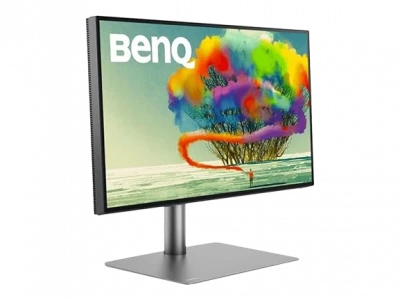
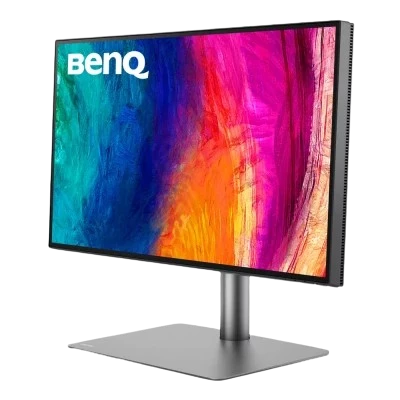
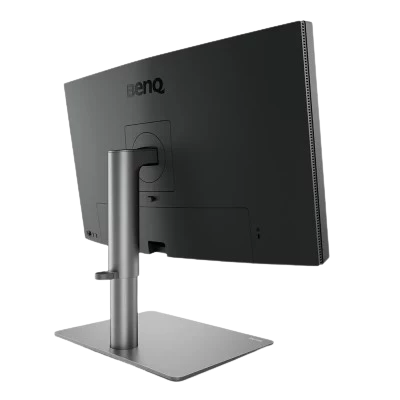
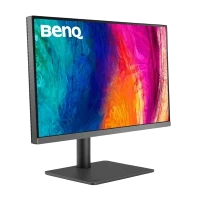
BENQ MONITOR PD2725U
₹62997.90
M.R.P.:
₹84990
Thunderbolt 3.... BenQ DesignVue Monitors PD2725U|27-inch 4K UHD P3 Thunderbolt 3 Mac® Compatible Designer Monitor
Hurry Up! Only 1 left in stock.
Compare
Description
| Model | PD2725U |
| Screen Size | 27 inch |
| Panel Type | IPS |
| Backlight Technology | LED backlight |
| Resolution (max.) | 3840x2160 |
| Brightness (typ.) | 250nits |
| Brightness (peak)(HDR) | 400nits |
| HDR | HDR10,VESA DisplayHDR 400 |
| Native Contrast | 1200:1 |
| Viewing Angle (L/R) (CR>=10) | 178°/178° |
| Response Times (GtG) | 5 ms |
| Refresh Rate (Hz) | 60 |
| Color Gamut | 100% Rec.709 ,100% sRGB ,95% P3 |
| Color Mode | Animation ,CAD/CAM ,Darkroom ,DCI-P3 ,DICOM ,Display P3 ,HDR ,Low Blue Light ,M-Book ,Rec.709 ,sRGB ,User |
| Aspect Ratio | 16:9 |
| Display Colors | 1.07 billion colors |
| PPI | 163 |
| Display Screen Coating | Anti-Glare |
| Color Temperature | 5000K ,6500K ,9300K ,User Define |
| Gamma | 1.8 - 2.6, sRGB |
| HDCP | 2.2 |
| AMA | Yes |
| Built-in Speaker | 2.5Wx2 |
| Headphone Jack | Yes |
| Voltage Rating | 100 - 240V |
| Power Supply | Built-in |
| Power Consumption (normal) | 44W |
| Power Consumption (max) | 185W |
| Power Consumption (sleep mode) | <0.5W |
| Power Delivery(USB C / Thunderbolt 3) | 65W |
| Tilt (down/up) | -5˚ - 20˚ |
| Swivel (left/right) | 30˚/30˚ |
| Pivot | 90˚ |
| Height Adjustment Stand | 150mm |
| Dimensions (HxWxD) (mm) | 449.8 - 599.8 x614.8x273.3 |
| Dimensions (HxWxD) (inch) | 17.7 - 23.6 x24.2x10.8 |
| Dimensions (HxWxD) (w/o Base) (mm) | 360x614.8x80.3 |
| Dimensions (HxWxD) (w/o Base) (inch) | 14.2x24.2x3.2 |
| Net Weight (kg) | 8.3 |
| Net Weight (lb) | 18.3 |
| Net Weight (w/o Base) (kg) | 5.6 |
| Net Weight (w/o Base) (lb) | 12.4 |
| VESA Wall Mount | 100x100 mm |
| Other Accessories | Calibration Report ,Hotkey Puck G2 ,QSG ,Warranty Card |
| HDMI (v2.0) | 2 |
| DisplayPort (v1.4) | 1 |
| Thunderbolt 3 ( PowerDelivery 65W, DisplayPort Alt Mode, Data ) | 1 |
| Thunderbolt 3 out ( PowerDelivery 15W ) | 1 |
| Daisy Chain Technology | Thunderbolt 3 |
| USB Type B ( Upstream ) | 1 |
| USB 3.1 ( Downstream ) | 2 |
| All-in-One Connection | Thunderbolt 3 |
| Flicker-free Technology | Yes |
| Low Blue Light | Yes |
| Solidworks | Yes |
| calman verified | Yes |
| Pantone Validated | Yes |
| Video Format Support | Yes |
| Factory Calibration Report | Yes |
| Delta E(avg) | ≤3 |
| Animation mode | Yes |
| CAD/CAM mode | Yes |
| Darkroom mode | Yes |
| KVM Switch | Yes |
| DualView | Yes |
| Auto Pivot | Yes |
| Uniformity Technology | Yes |
| Hotkey Puck G2 | Yes |
| PIP/PBP | Yes |
| ICCsync | Yes |
| Display Pilot | Yes |
| Warranty | 3 Years |

Additional information
| Product Broucher | Download |
|---|---|
| Vendor Link | https://www.benq.com/en-in/monitor/professional/pd2725u/spec.html |
| IS Gaming Product | yes |
Reviews
Be the first to review “ BENQ MONITOR PD2725U ” Cancel reply
Related products
-
Tech Attack Deal May 2024
₹ 39889.50BenQ PD2706U is a 27-inch 4K UHD designer monitor. It’s comes with P3 display HDR 400 and USB-C.Attentive Color Modes for Creators like DualView, CAD/CAM Mode, Animation Mode, Darkroom Mode, ePaper Mode Features: Accurate Colors Benefit Creators BenQ empowers creative professionals with AQCOLOR technology to help inspire ideas and make projects come to life. Factory Calibrated for Color Accuracy BenQ DesignVue monitors feature meticulous factory calibration, so designers make full use of total display color accuracy from the get go. Pantone Connect Premium Go digital with BenQ, the first brand to work with Pantone on a mobile app. As an existing owner or a new purchaser of BenQ professional monitors, you get one year of free Pantone Connect Premium for digitally mobile color consistency and accuracy.
Rated 5.0 out of 5 5.0( 5.0 Star ) -
₹ 43995.00BenQ DesignVue Monitors PD2706UA|27-inch Ergo Arm 4K UHD P3 DisplayHDR 400 USB-C Designer Monitor
Rated 5.0 out of 5 5.0( 5.0 Star ) -
₹ 23782.5027-inch 4K UHD (3840 x 2160 / 16:9) – designed for multi-taskers IPS panel with 178° Wide Viewing Angle designed for a truly premium quality picture The wide color gamut of 95% Adobe RGB, 99% DCI-P3, and 139% sRGB brings the most excellent range of colors Ultra slim design with a 1.17cm (0.46”) only thickness, and its sleek exterior makes it become a piece of elegant furniture & decoration in any space or desk MSI EyesErgo technology with Anti-flicker, Less Blue Light, and Anti-glare panel to protect your eyes MSI Eye-Q Check helps have self-check eyes & reminds to take a rest while using the monitor for a long time Built-in USB Type-C connection with 65W power delivery allows you to connect to and charge your devices effortlessly A 90° cable connection design brings the most convenient way to plug & unplug the cables on its back Enjoy the cleanest environment with a convenient and removable cable management design Exclusive software, Display Kit, provides the most convenient tool, the proper color & display mode to you while working with it every day.
₹ 43000Rated 5.0 out of 5 5.0( 5.0 Star ) -
₹ 20685.00PRO MP273U Perfect 27" screen size with UHD(2160p) resolution for the programming, video editing & website design workspace. TÜV certified display ensures the protection and health of eyesight. MSI EyesErgo technology with Anti-Flicker technology helps prevent eye strain and fatigue. MSI Eye-Q Check helps have self-check eyes & reminds to take a rest while using the monitor for a long time. Maintain versatility across various devices by utilizing multiple input sources, such as HDMI™ and DP ports. Enjoy the cleanest environment with a convenient and removable cable management design. Standard VESA mountable & Accessory slot design. Two built-in speakers.
₹ 32600Rated 5.0 out of 5 5.0( 5.0 Star ) -
₹ 36015.00Samsung LS43DM702UWXXL M7 UHD 4K Smart Monitor 3840 x 2160 @60Hz, LOT Hub, Multiple Port, Speaker, Remote, Daisy Chain, WiFi,43" 108cm
Rated 5.0 out of 5 5.0( 5.0 Star )


Ravi Dhiman
Bought for eye strain and KVM Eye strain much better and I love the quality of the monitor, especially on the new mac. Using with both Macbooks and M1 mac mini, it works great on both, but I am not a designer or a photo / movie editor professional. I am still trying to figure out the KVM, as it doesn't automatically waking up the different machines from sleep, as my previous monitor did.