GW2790C | 27” 1080p FHD BenQ Eye-Care Home Office Monitor
Work with All-Day Eye Comfort
You can now ease eye strain from nonstop docs and spreadsheets with BenQ Eye-Care Triple Protection. Enjoy GW2790C’s clean design, sharp visuals, and all-day adaptive eye comfort for great productivity.
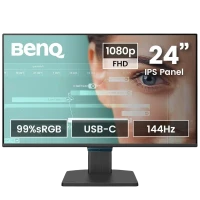
BenQ GW2790C comes with 99% sRGB color for greater color performance
BenQ uses IPS panel for vivid colors and sharp clarity
BenQ GW2790C delivers USB-C for fast data transfer and broad device compatibility
BenQ's exclusive triple eye-care protection with Visual Optimizer reduces eye fatigue
BenQ GW2790C is TUV-certified with Eye Comfort 4-Star and Eyesafe Certified 2.0, with low blue light, flicker-free, and much more
BenQ GW2790C provides 144Hz refresh rate for smooth motion
Adaptive Eye-Care. Steady Eye Comfort.
You shouldn’t have to adjust setting after setting just to protect your eyes. That’s why BenQ Eye-Care Monitors come equipped with Triple Eye Protection, with Visual Optimizer, Low Blue Light, and Flicker-Free technology to deliver effortless, all-day eye comfort.
Your Screen Knows the Light
Adaptive Comfort, Your Way
Adaptive Comfort with V.O. Hotkey—adjust brightness and color temperature separately for personalized eye comfort.
Visual Optimizer (formerly B.I.+), or V.O. for short, puts an end to eye strain. With a built-in sensor that optimizes brightness and color temperature for your environment, BenQ has thought of eye health well beyond just blue light protection. No guesswork, no fiddling—just comfortable viewing, from 9 to 5 and beyond.
We Cut Blue Light, Not Color Quality
Say Goodbye to Invisible Flicker
Low Blue Light cuts eye strain without yellow tint—TÜV-certified protection that preserves true colors.
Flicker-Free keeps the screen steady—protects eyes from invisible flicker for all-day comfort.
BenQ’s TÜV-certified Low Blue Light technology protects your eyes during long hours of work, without giving your screen a yellowish tint. You can fine-tune the level to find the right balance, so your work always looks just the way it should.
BenQ’s Eye-CareU software is your screen-time sidekick, managing time, lighting, and posture with quick controls that keep you focused
BenQ Eye-CareU
Try Eye-CareU for a Healthier Viewing Experience
Meet Eye-CareU—your screen-time sidekick on the BenQ GW monitor. It helps manage time and lighting with quick controls that keep you focused.
*Available in both Light and Dark themes for your eye comfort.
Free Download
Learn More
Certified for Eye Comfort—TÜV 4-Star standard and Eyesafe Certified 2.0 prove GW2790C protects your eyes all day.
Certified Eye Comfort You Can Trust
Backed by TÜV Rheinland’s Eye Comfort 4-Star certification and Eyesafe Certified 2.0 endorsement, the GW2790C meets strict international standards for visual wellness. It’s proof your eyes are in good hands, every hour of the day.
Ambient Light Management
Ambient Light Management
Color Accuracy
Color Accuracy
Color Gamut
Color Gamut
Flicker Free
Flicker Free
Low Blue Light
Low Blue Light
Refresh rate
Refresh rate
Sharp images and vivid colors with 99% sRGB IPS panel plus ultrathin bezels for focused, comfortable viewing.
Sharp Images, Gentle on the Eyes
Experience vivid colors and reliable clarity from any angle with the GW2790C’s IPS panel and 99% sRGB color gamut. Its 4-sided ultrathin bezels help you stay focused and comfortable through document edits and multitasking throughout the day.
Streamlined Design, Smarter Workflow
Thoughtfully crafted for a clean desk, efficient connections, and comfortable workdays.
USB-C connection for fast data transfer and broad device compatibility
4-sided ultrathin bezels for seamless, focused viewing.
One USB-C Does It All
USB-C simplifies your workflow by transferring data and connecting to your devices with just one cable.
4-sided Ultrathin Bezel Design
GW90QT/ GW85TC
Enhance Productivity for Programming
Learn More
BenQ Best Monitor for programming
Support
Add Flow to Your Workflows
Learn More
FAQ
Have a question?
Learn more
Download
Find the latest user manual
Learn more
facebook twitter instagram youtube linkedin
subscribe
Subscribe
Products
Projector
Monitor
Lighting
Where to Buy
Solutions
Business
Education
Support
Call Us
Warranty Checker
FAQ Video
Download Search
Online Request
Shopping FAQ
Resources
Create Big Screen Cinema in Your Small Apartment
BenQ Knowledge Center
About BenQ
Corporate Introduction
The Brand
Leadership
News
Copyright © 2024 BenQ. All rights reserved. Privacy Policy Cookie Policy Terms of Use Notice Import/Export ComplianceIndia - English
The E-store is Serviced by FORERUN SYSTEMS PRIVATE LIMITED



Reviews
5.0 Average Rating Rated ( 0 Review )